
McKinsey Sustainable Futures Lab 2026: The New 30-Minute Island Version
What the new 30-minute Sustainable Futures Lab looks like, who reports getting it, how the three-day loop works stage by stage, and a free playable practice run.
On this page
The short version
If your McKinsey Solve invitation says 95 minutes, you may meet a different Sustainable Futures Lab from the one most guides describe. Candidates report a rebuilt module of about 30 minutes: you lead a small research team over three project days instead of ranking initiatives in a single sitting. McKinsey has not published it, and it first appeared in candidate reports in late August 2026, so everything below is reported, not official. We say which parts come from candidates and prep providers, which parts are how our own practice island works, and which parts nobody knows.
Quick answers before you read on
I have no invitation yet. Which Sustainable Futures Lab should I practice?
Practice both. Practice 1 of SFL Island and Simulation 1 of SFL Classic are free, and one SFL pack opens both libraries. If you want the more demanding, newer interface first, start with the island, then add Classic for the 85-minute case.
Does a 95-minute invitation guarantee the new version?
No. The map from invitation length to version comes from candidate reports, not from McKinsey. The instruction screens before each game are the only authority, so treat the number as a strong clue.
Is the new version harder than the old one?
Prep providers report that the questions are no harder. The operating load is higher: several panels and a clock on screen at once, with a few choices about what to find out. The cost shows up as lost time on Day 1.
Do I need strong math for it?
Not for this module, which has no calculation to speak of. Red Rock is where numeracy pays, which is why a Solve prep plan adds short Quick Math sets alongside the SFL runs.
How long is one practice run?
30 minutes on the Simulation clock, for the whole three-day project. Learning mode is untimed and adds a coach after each stage.
What is the fastest useful first step today?
Play Practice 1 free in Simulation mode, read the debrief, then replay it in Learning mode one stage at a time. Start the free island run.
Which version will you get?
Read the total time in your invitation. It is the one signal that has held across regions.
85-minute invitations with the standard version kept arriving after the 95-minute reports began, so do not assume the old version is gone. Not sure which one you will get? Practice for the length on your invitation first and add the other, because one SFL pack covers both.
Where to practice for your invitation
65 minutes
Open Red RockRed Rock and Sea Wolf, no Sustainable Futures Lab.
Spend the time on the two games you will meet.
85 minutes
Open SFL ClassicThe standard SFL: about 13 decisions in 20 minutes.
SFL Classic, free Simulation 1.
95 minutes
Open SFL IslandThe reported new SFL: about 30 minutes over three project days.
SFL Island, free Practice 1 with a worked debrief.
No invitation yet
Either could arrive, and the invitation has the final word.
Run the free island practice and Classic Simulation 1, then let a plan sequence the rest.
Know your invitation length and test date?
Answer two questions and get a day-by-day Solve plan: the free runs first, short Quick Math sets, timed repeats and a full rehearsal the day before. Building it is free.
What changed from the standard version
The new module is a different kind of task, not a longer copy of the old one.
The second point changes how you think. In the standard version every fact is in front of you and the work is judging it. Here you decide what to find out first, so a good run starts before the first answer: with a question about what today's goal needs.
Two cautions. The numbers come from candidate reports, not from McKinsey, so a regional rollout can differ from what you read here. And the longer module adds to Red Rock and Sea Wolf rather than replacing them, which is why the invitation grows by ten minutes. Block the full time and read each instruction screen before you start a game.
How a three-day run plays
Candidates and prep providers describe a tutorial, an onboarding briefing, then three project days. You lead four researchers with different specialisms across four workstations. Reports describe Day 1 centred on the researchers' needs, Day 2 on the workstations' needs and Day 3 on balancing both, and each day repeats the same four stages.
Explore, Assign, Support, Reflect
- 01
Explore. Spend a few Explore Requests to buy answers about a researcher or a workstation. One request buys one answer.
- 02
Assign. Move researchers between workstations and give a reason for each move. A workstation holds a limited number of people.
- 03
Support. Researchers bring you requests, often connected to each other. You pick a response to each, goal first.
- 04
Reflect. Rate how each researcher feels, on the dimension the day asks about. Then the team resets overnight.
The screens below are from our own practice island. They show the same four stages as candidates describe, but they are Road to Offer screens, not McKinsey screenshots.
Explore: buy only what changes today's decision
Each day you get a small number of Explore Requests. In our practice it is three on Day 1, three on Day 2 and two on Day 3, and a person or station can answer one question per day. Opening a menu and cancelling costs nothing. Some prep sites call these tokens.
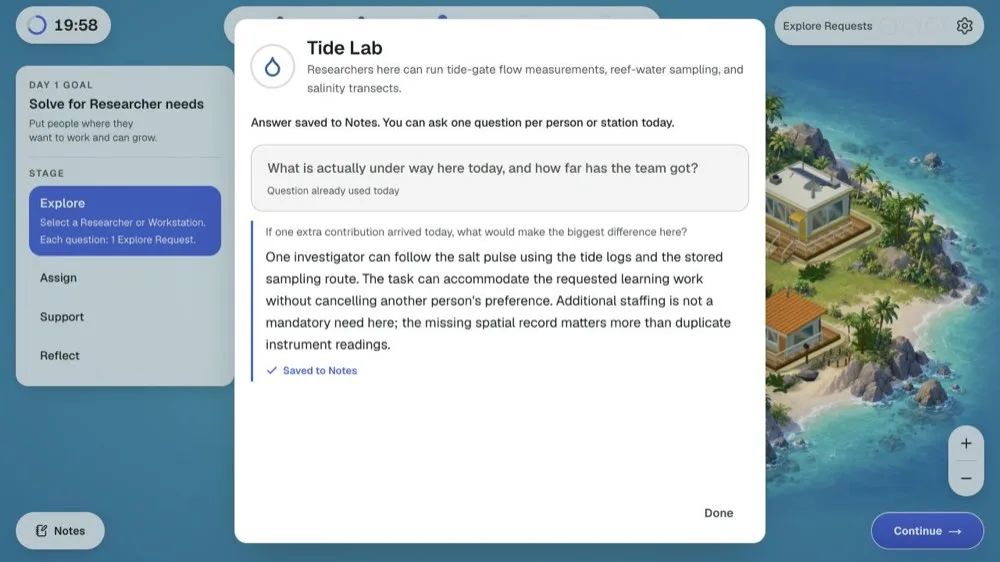
Cheap questions are tempting. The useful ones tell you what a person needs or what a station is missing, not what they have already done. Before you buy anything, decide which placement or request you are trying to settle today, then ask the question that settles it. Buying answers evenly just to use up the allowance is the most common way to waste Day 1.
Assign: a reason behind every move
You review the starting placement and move researchers only when the day's evidence supports a better one. In our practice a workstation holds up to two researchers, and each move carries a reason. Prep reconstructions recall five of them: the researcher's preference, their skill fit, advancing the day's goal, the workstation's current need and workstation coverage.
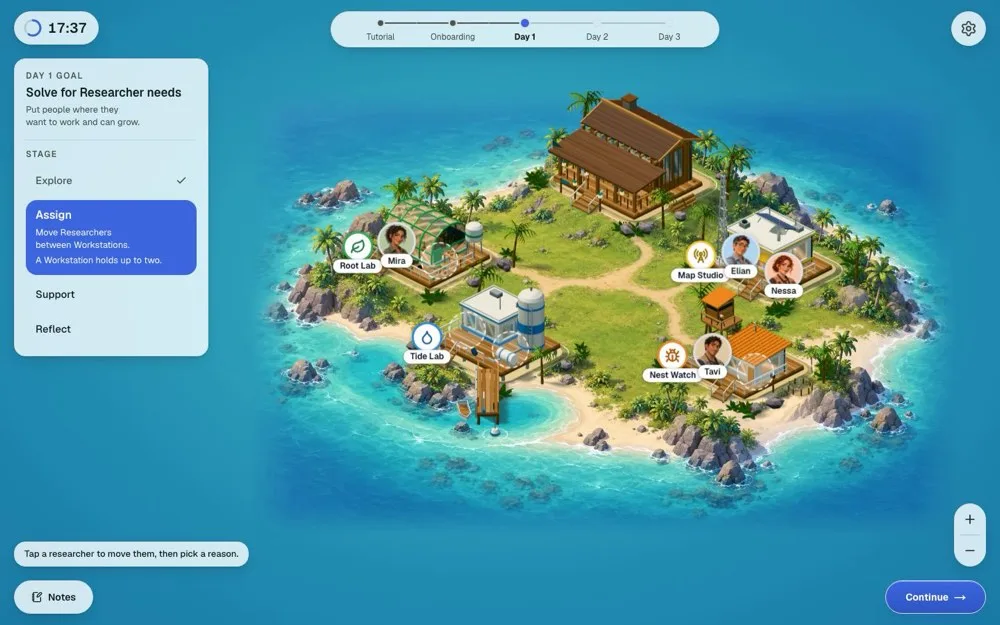
Most reasons only score when you bought an answer that supports them today. "She prefers the lab" is an unsupported explanation if you never asked about her preference, however sensible the move looks. The test is whether you can point to what you bought, not whether the placement happens to work out. Capacity is tight, so the question is rarely who is best at a station and usually who gains most from it while the others still have somewhere to work.
Support: the project-lead calls
Researchers bring you requests, and they overlap: one person's need collides with another's. Candidates report about four requests a day, often linked across workstations, each with two to four response options. These are project-lead calls: what to do first, whom you back in a disagreement, when to do the work yourself and when to hand it over, which method to trust.
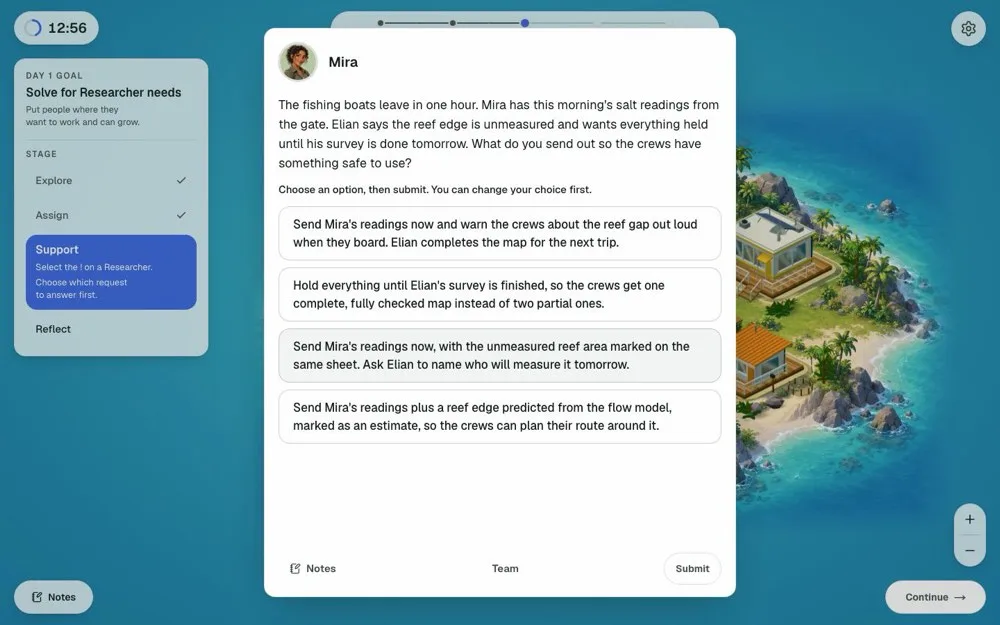
The options are written so that more than one sounds reasonable. Read what the person actually wants the response to achieve, then check each option against the day's goal and against what you already told someone else. A reply that reassures one researcher can load work onto another, and an answer that sounds kind can still stall the project.
Reflect: rate what you actually saw
At the end of the day you rate each researcher on one dimension. In our practice the dimension changes: how certain each feels about the project, how each feels after the field decisions, how involved each feels in the decisions. Reports describe three scale options plus "I don't know", with an answer required for every researcher.
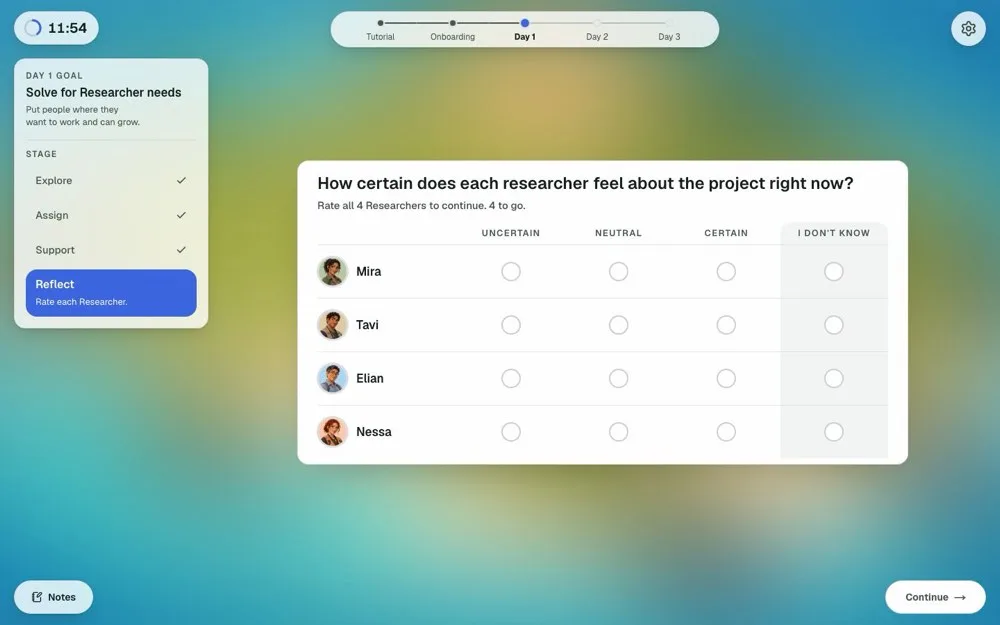
The ratings are a consistency check, so they should follow from what you bought and answered earlier in the day. Guessing, or marking everyone "certain" by default, shows that you did not read the team. Use "I don't know" when you truly have no evidence, not as a shortcut. Prep providers report that candidates struggle to remember what they told each researcher hours earlier, which is why a short written note per person pays off.
What resets overnight
Between project days in our practice
Stays overnight
- Researcher names and titles
- Workstation descriptions
- The onboarding context
Clears overnight
- Answers you bought
- Your Notes
- Your placement and the Support state
Between days the team resets. Researcher names and titles, workstation descriptions and the onboarding context stay. Bought answers, your Notes contents, your placement and the Support state clear, and your Explore Requests refill. In our practice that is the rule, and a candidate discussion reports a similar loss of previous-day information on the real module, so assume nothing carries over by itself. McKinsey's integrity rules allow pen and paper for your own notes unless your instructions say otherwise, so check yours before test day and write down what matters.
The interface is the real difficulty
Prep providers report that the questions are no harder than before, but the operating load is much higher. You move between researchers and workstations several times a day, with notes, a goal, a clock and availability markers on screen at once. Candidates spend Day 1 learning the layout instead of deciding, and that is the cost of arriving unprepared. Practicing the screens is not cheating the module, it is paying the orientation cost before the graded run.
Why Day 3 is where candidates rush
The 30-minute clock does not split evenly. Day 1 runs long while you learn the interface, Day 2 runs normally, and Day 3 gets what is left. If the first two days overrun slightly, the final decisions, where consistency matters most, happen under pressure.
What it tests
Prep providers describe five things: prioritisation under limited information, acting on incomplete evidence instead of buying answers forever, reading people as well as tasks, matching individual strengths and states to the work, and staying consistent across three days of linked decisions. None of this is calculator work. It is the same judgment the standard version tested, with a more demanding interface around it.
Nobody outside McKinsey knows the scoring, and any guide that states weights for the real module is guessing. Candidates sometimes ask whether this is a situational judgment test. Our read is that it is closer to a project simulation: the answer options are written like situational judgment items, but your earlier choices change what is available later.
How it differs from Red Rock and Sea Wolf
Red Rock rewards clean arithmetic on exhibits and Sea Wolf rewards meeting targets under constraints. The new Sustainable Futures Lab has no real calculation, so strong numeracy does not help it, and speed drills are the wrong preparation. Practice judgment you can explain.
A method that holds across three days
Two short habits keep the three days consistent.
Before you spend a single request, ask three things. What does today's goal demand? Which one unknown would change my placements most? Which commitment from yesterday must today still respect? Write the goal down in a few words so it survives the screen changes.
Before you answer a Support request, check four things. What does this person want the response to achieve? What is the one constraint that limits my options? Which option serves the work and the team at the same time? What would this answer tell the rest of the team about how I lead? Choosing the locally clever option while contradicting yesterday is how consistency breaks.
Practice it for free
Our independent practice island, SFL Island, follows the same loop on a 30-minute Simulation clock. There are ten practices, each a new project with new researchers and new facts. Practice 1 puts you on a small island with four researchers, four workstations and a tidal gate that has changed an inlet. It is free and ends with a full worked debrief; practices 2 to 10 come with the SFL pack. The scores belong to our training model, so each point shows where it came from.
Live free simulator from Road to Offer for the McKinsey Solve Sustainable Futures Lab scenario game. Practise this style of assessment in the browser, no account needed to start.
Three decisions, in plain words
These are original teaching examples, not questions from the module or from our practice, and they do not give the answer key.
- Two researchers need the same station and you can serve one today. Choose the one whose delay costs the others less, and tell the other when they get their turn.
- A fisher and a field team disagree about a boundary. Put both counts on the same sheet and agree one line, rather than siding with the louder voice.
- Your best specialist is tired and a technician can start now. Let the technician do the work and keep the specialist for the check.
The right answer in any real run depends on the facts you bought, not on a rule of thumb. That is exactly what the debrief in our practice walks you through.
Common mistakes
- Preparing with the old format. Practicing only the 13-decision version, then losing Day 1 to an unfamiliar interface.
- Spending the allowance evenly. Asking everyone one question each instead of buying what the day's goal needs.
- Placing by job title. Moving researchers by what their title suggests instead of by what you learned they need.
- Asking only about strengths. Learning what someone can do but never how they are doing, so the team state stays a blank.
- Guessing on Reflect. Marking everyone the same without a cue you can name.
- Writing no notes. Trying to remember what you told each researcher, then rating inconsistently.
- Looking for a single right answer. Support rewards a coherent line across the days, not one clever choice.
- Rushing Day 3. Treating it as a formality because the interface now feels familiar.
- Reading the practice score as a forecast. Our scores teach the loop, they do not predict a McKinsey result.
A week before your assessment
Learning mode, repeats and practices 2 to 10 come with the SFL pack, the Solve pack or Annual. Practice 1 needs no upgrade. If your invitation says 85 minutes, SFL Classic is the format to practice, and it is in the same pack.
Your prep plan
Turn the week into a plan
Tell us your invitation length and test date. The plan schedules the free island run, the Learning mode repair, short Quick Math sets and a full rehearsal, day by day. Repeats and Learning mode come with the SFL pack ($29), the Solve pack ($79) or Annual.
See the packs
SFL pack $29 for SFL Island (ten practices) and SFL Classic. Solve pack $79 for Red Rock, Sea Wolf and both SFL formats. Annual includes both.
What we know, what is reported and what is not known
Known. McKinsey's own Solve FAQ lists the game types, says the length of your assessment is in your invitation email and says task tutorials are untimed.
Reported by candidates and prep providers. The three-day structure, the four researchers and four workstations, the Explore, Assign, Support and Reflect loop, the day goals, the longer module on 95-minute invitations, and the time pressure on Day 3. The sources we read: a PrepLounge thread (August 24 onwards), a September 16 Reddit account of a candidate who got the new format, a September 29 Reddit discussion and prep-provider write-ups such as StrategyCase's guide to the new version. We have not been able to confirm any of it independently.
Not known. The scoring, the weighting, whether the Reflect ratings feed the score directly, whether the new version will spread or replace the standard one, and how long it will last.
Reviewed October 9, 2026. Road to Offer is independent and not affiliated with or endorsed by McKinsey.
Keep reading
Frequently asked questions
Resources and related guides
- Run a real case interviewPractice
- Browse all free resourcesResource hub
- Does Everyone Get McKinsey Solve? What the Invite MeansFirm Specific · Oct 11, 2026
- Does McKinsey Solve Matter? How to Split Your Prep TimeFirm Specific · Oct 11, 2026
- Is McKinsey Solve Proctored? Rules, Camera and SetupFirm Specific · Oct 11, 2026
- McKinsey Ecosystem Building: Strategy, Status, and What Replaced ItFirm Specific · Mar 7, 2026