


Sustainable Futures Lab
New 2026
Save $20$49
$29one-time
- Ten island practices, one free and the rest in the pack
- Eleven Classic SFL simulations
- Scored debrief on every run
Practice
Learn
Assessments
Opens the full-screen simulator.
Got your Solve invite?
Build my Solve planRoad to Offer is independent and not affiliated with or endorsed by McKinsey. This is original practice content built from publicly available information about the assessment format, not a copy of the live assessment. Formats change between offices and recruiting cycles.
New to the island format? Read the complete SFL Island guide below and the SFL Classic practice.
One full island project in the 2026 format: three Days, four stages each. The company, researchers and facts are original Road to Offer content.
| Free | One full Sustainable Futures Lab run with your score and full worked debrief saved in History. Learning mode still requires existing pack or included Annual access. |
|---|---|
| Structure | A tutorial and an onboarding, then three Days. Each Day has four stages: Explore, Assign, Support and Reflect. |
| What you do | Spend Explore Requests on answers about researchers and workstations, assign researchers to workstations with a stated reason, answer support requests, and rate how each researcher feels. |
| Clock | Simulation runs on one 30-minute clock for the whole project, with feedback at the end. Learning mode is untimed, with a coach after each stage. |
| Skills scored | Onboarding, Explore, Assign, Support and Reflect, each shown separately in your result. |
| Your result | Where your points went by stage, your one focus area and your project day by day with the feedback behind it. |
The quick version: SFL Island is our practice for the newer Sustainable Futures Lab that candidates report on some 95-minute McKinsey Solve invitations since late August 2026: roughly 30 minutes leading four researchers across three simulated days. McKinsey has not published the format, so this practice trains the underlying skills rather than replicating a live module. An 85-minute invitation points to the older ranking format, which has its own page: SFL Classic.
Ten island practices are live. Eleven Classic simulations are open too. $29 once. Simulation 1 is free.
Spend Explore Requests on what researchers and workstations need.
Place each researcher with a reason, then answer their requests.
Your choices day by day beside the feedback, then your next run.
Finish 5 of 10 Sea Wolf and 5 of 10 Red Rock simulations first.
A sound choice can fail when the next fact changes the constraint. This simulation asks you to hold one business objective across a connected pilot, update your view when evidence changes, and separate a reversible test from a premature scale decision. Those habits transfer directly to case interviews: define the decision rule, use the evidence in front of you, and revise the plan without losing the objective.
Start free in Simulation mode. A short tutorial shows the controls, then onboarding asks you to order four questions and reads you the answers in that order; write them down, because nothing in the project holds them for you. If you are not signed in, you create your account at that point, and the same attempt continues into Day 1 with your remaining time. Each Day you buy answers with a limited number of Explore Requests, assign researchers with a reason for every move, answer support requests and rate how each researcher feels, then the day resets overnight. Your final server-scored result is saved in History. One full run is free; further practices are available in paid packs.
These patterns teach the method without revealing any answer from the simulation.
Resolve the definition and source before making the decision. A fast recommendation built on incompatible baselines only hides the uncertainty.
Align the measurement rule first, then compare the evidence.
Find the source of the variation before treating the average as the whole story. A site-level failure can point to an operational fix or prove that the model does not travel.
Diagnose the outlier before you make the scale decision.
State what the current evidence supports, name the open assumption, and define the next check that can change the decision.
Give a bounded recommendation with a clear condition for revision.
Each mistake replaces the decision rule with a shortcut.
Sustainable Futures Lab (SFL) is the judgment and prioritization game that candidates report as the third module of McKinsey Solve, after Red Rock and Sea Wolf. The standard Classic format has no calculator or data exhibit: you rank actions, then make linked decisions about a sustainability project, its team and its stakeholders. In 2026 there are two reported versions. Candidates with an 85-minute invitation describe a 20-minute SFL of about 13 decisions. Since late August 2026, some candidates with a 95-minute invitation describe a new, roughly 30-minute SFL in which you lead a team of four researchers over three simulated days. McKinsey has published neither format, so everything below is labelled by how we know it, checked October 3, 2026. Classic names the older ranking-and-scenario format; Island names the newer team-management workflow. A September 16, 2026 candidate account describes the island format, but does not establish a universal rollout.
Read the total time in your invitation email. McKinsey's Solve FAQ says the length of your assessment is in that email and that each task starts with an untimed tutorial. Candidate and prep-provider reports associate 65, 85 and 95 minutes with the combinations below, checked October 3, 2026. This is a preparation clue, not a guaranteed lookup rule for every role, office or accommodated sitting:
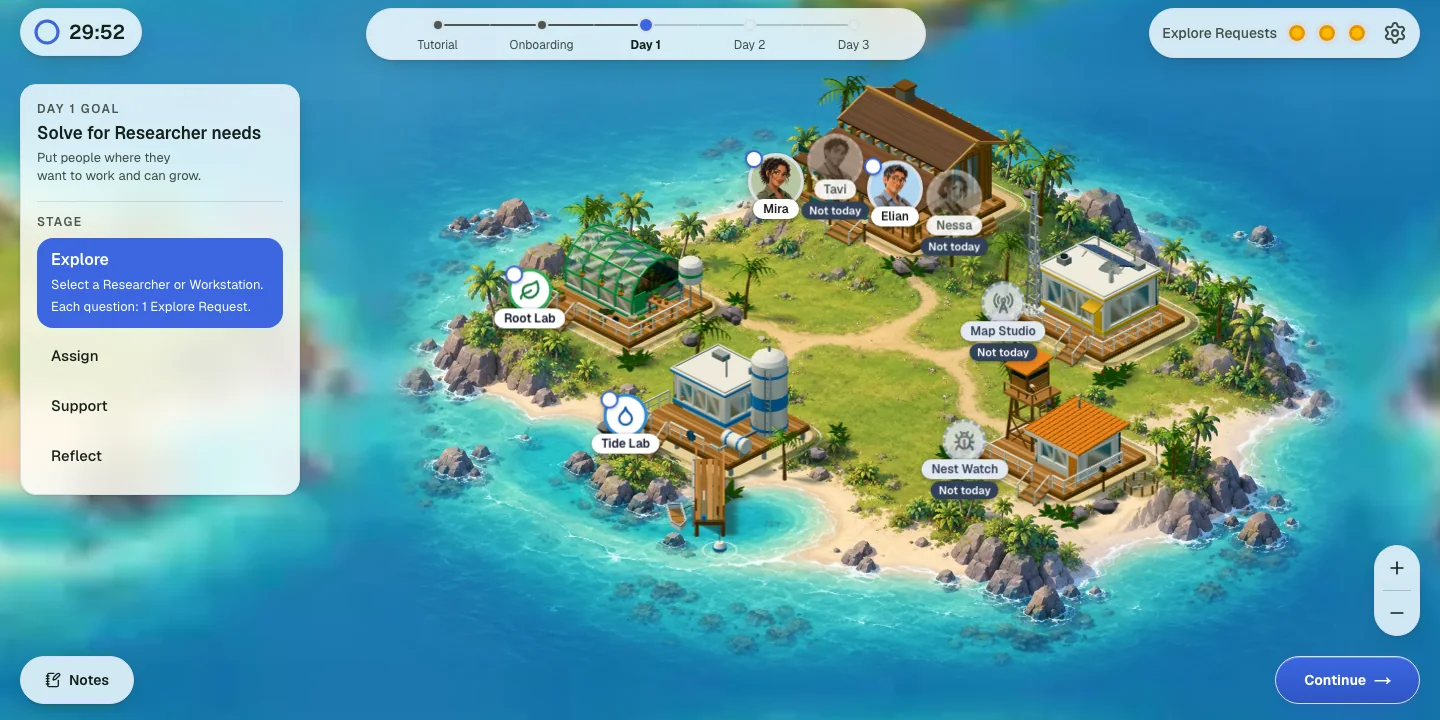
Three facts matter more than the map itself.
A 65-minute invitation points toward Red Rock and Sea Wolf in these reports; 85 points toward standard SFL and 95 toward Island SFL. Read the relevant walkthrough, then confirm the actual games and controls in your own instructions. Classic trains useful judgment habits, while Island adds information purchases, justified assignments and an overnight reset.
Got a 95-minute invitation? Run one free island practice
Practice 1 is free with your score and full worked debrief. The SFL pack opens practices 2 to 10 and the Classic simulations too.
The change is from a ranking-and-scenario sequence to a connected team project. The September 16, 2026 account contrasts 13 Classic questions with three Island project days. It repeats the same candidate's account, rather than providing an independent second witness. Reports still describe both versions.
The skills overlap more than the screens do. Both versions reward setting a clear objective first, spending scarce attention on the facts that change the decision, updating when new evidence lands, and keeping people on side without giving up the plan.
McKinsey's official Solve page describes a game-based assessment considered with the rest of the application. The August 2025 FAQ, checked October 3, 2026, says each task starts with one untimed tutorial and establishes invitation timing, but no public specification for either SFL version. The three-day blueprint and exact controls remain candidate-reported.
The candidate SFL Field Guide supplied October 2, 2026 reconstructs one sitting and explicitly marks several recollections uncertain. It is the source for the detailed Explore, Assign, Support and Reflect sections below, not official test material. McKinsey prohibits other applications, websites, AI tools and prepared notes during Solve, as well as recording or capturing the assessment. Use these methods during preparation and follow the official assessment integrity expectations on test day.
The standard format that candidates report on 85-minute invitations is about 13 ranking and scenario decisions in 20 minutes, with every fact on screen. It is a different task from the island, so it has its own page, method and practice: SFL Classic. If your invitation says 85 minutes, start there; if it says 95, stay on this page.
This is the roughly 30-minute version associated with some 95-minute invitations, first reported August 24, 2026. The step-by-step detail below comes from prep providers who reconstructed it from candidate reports (PrepMatter, which says it sat the redesigned assessment in September 2026, and Solve Games Guide); McKinsey has not confirmed any of it.
You lead a field research lab with four researchers who have different specialisms and four workstations that need staffing. After a tutorial and onboarding, the game runs three project days, and each day opens with a goal: reports describe Day 1 centred on the researchers' needs, Day 2 on the workstations' needs, and Day 3 on balancing both. Each day repeats four stages.
Prep reconstructions describe text instructions with no calculator or data exhibits, and answers recorded in a scrollable Notes panel. The supplied Field Guide says bought answers remain accessible during the current day and clear overnight; a scrollable panel is not evidence of cross-day persistence. The scarce information requests are the main difference in feel: in the standard version every fact is on screen, while here you choose which facts to buy.
How Road to Offer covers it: SFL Island is the practice for this format. Ten island practices are live: Practice 1 is a full free Simulation run with a worked debrief, and practices 2 to 10 come with the SFL pack, which also opens the 11 SFL Classic simulations. Use the workflow below to prepare for the island's three days of Explore, Assign, Support and Reflect.
Use the tutorial to understand the controls, then order the briefing questions by what you need to learn first. The supplied October 2, 2026 Field Guide, section 4, recalls four onboarding questions, all answered in the chosen order. It treats the ordering as potentially scored but does not establish McKinsey's scoring rule.
The useful distinction is sequence versus importance. A question can matter greatly while still depending on another answer. Read what the project needs, identify that dependency and choose an order deliberately. When the answers arrive, separate enduring project context from information that changes each day. The Field Guide reports that onboarding answers are not retained in Notes, so inspect your own instructions rather than assuming you can reopen them later.
Do not dismiss the briefing or rush the tutorial because one candidate found it confusing. Learn where the timer, day goal, availability markers, Notes and Continue controls are. McKinsey's FAQ says task tutorials are untimed. The Field Guide recalls one clock across the Island project after the tutorial, approximately 30 minutes but explicitly uncertain, rather than a new clock for each phase.
Spend a request on information that can change today's decision. In the Field Guide supplied October 2, 2026, section 5, one request buys one answer; opening the menu and cancelling costs nothing. Daily request counts and availability are recalled less confidently, so read the current screen before planning purchases.
Start with the free researcher titles and workstation descriptions. Then ask what you still need to justify a move: a researcher's preference, their relevant skill, the workstation's current work or its immediate need. A title alone is weaker evidence than a current answer about what that person can contribute today.
Notes contain bought answers for the current day in the Field Guide's recollection. Names and workstation descriptions remain stable, while bought answers clear overnight. A September 29 candidate discussion also reports unexpected loss of previous-day diary information. This is why our practice clears bought notes overnight. It does not establish the behavior of every live version.
Do not buy information merely to exhaust the budget. Read the day goal, identify the decision that lacks evidence, then choose the question that resolves it. This is the same decision-first habit taught in case interview structuring, applied here to people and workstations.
Review the starting placement, then move a researcher only when the day's evidence supports a better assignment. The October 2, 2026 Field Guide, section 6, recalls five reasons for a move. Our practice adopts that menu while making the partly inferred evidence mapping explicit as a training model.
The Field Guide recalls the system pre-placing one or two researchers per occupied workstation, usually leaving one station empty. You may move none or all four researchers; whether one person can be moved twice was not tested. The practical method is to choose the reason before committing the move. This exposes an unsupported argument while you can still reconsider. Filling an empty workstation may be sensible; it is not automatically superior to meeting a specific need elsewhere. Do not invent a universal rule that every workstation must be occupied.
This is a teaching example, not a recalled McKinsey question or a scored product output. A restoration project needs a diagnosis before choosing a treatment. The Plant workstation says its immediate blocker is interpreting soil measurements. Researcher Rowan says their strength is analyzing those measurements, while another researcher prefers community communications.
If you bought Rowan's skill answer today, moving Rowan to Plant with a skills-fit reason is supported by the facts in this example. “Rowan prefers Plant” would be an unsupported explanation: no preference answer was supplied. If you only read Plant's free description, you know what happens there but have not established Rowan's suitability. The lesson is to distinguish a plausible placement from the evidence behind its stated reason.
Read the situation and the goal before choosing between reasonable-sounding responses. The Field Guide supplied October 2, 2026, section 7, recalls four Support questions per day, often connected across workstations. It recalls two to four response options, occasionally five. That count is candidate-reported; the exact arrival order and prompts may differ. Several bubbles may wait at once, but cancellation and previewing later questions without answering were not tested. Do not assume either control is safe or available.
Look for what the researcher wants the response to achieve: keep people engaged, communicate changed findings, reduce friction or coordinate work. A response can sound considerate yet fail that goal. Conversely, acting quickly can be harmful if it makes a commitment unsupported by the evidence.
In our original example, new measurements invalidate yesterday's treatment plan. A useful response explains what changed, recognizes the team's frustration and gives a concrete revised task. Simply promising to keep the old plan avoids discomfort but contradicts the new evidence. This is a constructed example of goal-directed communication, not a universal answer key.
Track promises made to other researchers. A choice that reassures one person can increase another's workload. Behavioral practice can help you articulate the decision for the separate live-interview job.
Read the day's dimension, then assess each researcher from the information and interactions you actually saw. The October 2, 2026 Field Guide, section 8, recalls three scale options plus “I don't know”, with a response required for each of the four researchers. It remembers confidence and work balance as different daily dimensions, but not the third dimension.
Do not choose “confident” for everyone by default or treat a question about confidence as a question about workload. Record the cue, the person it concerns and the effect of your Support response. A request from one researcher may describe a problem affecting another.
The Field Guide hypothesizes that Reflect reads the team state produced by your Support choices. Our practice uses that interpretation; McKinsey's hidden grading has not been disclosed. “I don't know” should express an actual evidence gap, not a memorized trick. Synthesis practice trains the separate habit of distinguishing an observation from an inference when you explain a conclusion.
Start each new day from its current goal and information. The Field Guide supplied October 2, 2026, section 1, reports two overnight transitions across three days. Names, researcher titles, workstation descriptions and the onboarding context persist; bought answers, Notes contents and the previous assignment clear. The set of unlocked targets usually changes too.
Remembering onboarding context is different from reopening it in Notes: the guide says those answers are not retained there. Its section 6 also reports changing project needs, workstation needs, researcher preferences and skills. Reassess the day rather than carrying forward an old placement. The sequence is fixed and the guide reports no going back within or between days; after Day 3 the project ends. Follow your own tutorial if its controls differ.
Both formats train explicit criteria, constraint checks and evidence-led communication. The four stages across three days in the September 16, 2026 report add information choices and team-state interpretation to those habits. These are preparation methods, not disclosed McKinsey scoring weights.
The first is whether you can apply a stated decision rule. A prioritization item hands you explicit criteria and then offers an option that feels important but scores poorly against them. Computing the criteria first produces a defensible order; instinct alone does not.
The second is whether you treat constraints as constraints. When one initiative cannot begin until another is delivered, or a researcher cannot work a station without the right skill, that dependency is a hard rule, not a tie-breaker.
The third is whether you can handle disagreement without either capitulating or stalling. A stakeholder or researcher objects and offers no new data. Reordering to keep the peace makes the process arbitrary; going quiet lets the problem grow. The stronger move is to acknowledge the concern, show the evidence and create a concrete route forward. It is the same disposition McKinsey probes in the Personal Experience Interview.
The island has no ranking task. The ratio-and-dependency ranking method belongs to the standard format, so the worked example, the decision-cue table and the practice live with SFL Classic. What carries over is the habit: apply the stated rule first, then respect hard constraints such as a researcher's missing skill.
Use three moves: acknowledge, evidence, action.
The weak extremes are capitulation and delay. In the new version the same rule applies to your researchers: doing whatever the researcher asks or ignoring them can leave the problem unresolved. Answer the actual problem and keep the day's goal visible.
Check purchases that change nothing, unsupported reasons and old conclusions reused without fresh evidence. The Field Guide supplied October 2, 2026 describes five assignment reasons, so a plausible move still needs the right argument. The table covers common traps in both formats.
When reviewing a mistake, name the trap and rewrite the decision using the prompt's actual rule. That transfers better than memorizing which option was correct in one scenario.
Match the preparation to the displayed format, then rehearse explaining each decision. The roughly 30 minutes in the September 16, 2026 Island account cover the whole project, not an allowance per stage. The first five sessions below train shared judgment habits; the sixth adds Island information discipline.
Keep other preparation matched to its task: graph interpretation drills train Red Rock exhibit reading. After Solve preparation, how to practise case interviews covers the separate live-interview format.
Practise under the time your own invitation states, keep the decision rule visible, and follow the live tutorial over any guide, this one included.
The reported combinations described above include Red Rock, Sea Wolf and SFL. One September 16, 2026 candidate reports all three games, not a universal order or allocation. Switch methods between them. Sea Wolf is constraint satisfaction: filter microbes against disqualifying rules, then build a set whose averages meet every threshold. Red Rock is exhibit reading and calculation, where the traps are units, fixed costs and irrelevant-but-true facts. SFL has the least computation and the most instinct-versus-criteria conflict.
The Red Rock study guide goes phase by phase, and the umbrella McKinsey Solve guide covers how the assessment sits in McKinsey's process. All six firm assessment simulations Road to Offer publishes are on the assessment simulators page, and the McKinsey case interview guide covers the live rounds Solve is a gate for.
The assessment comparison guide explains how to compare practice tools; check demonstrated format coverage rather than assuming “SFL” always means Island practice.
Candidates report questions about their experience of the assessment, including clarity of the new SFL. The September 16, 2026 cross-post describes roughly 20 feedback questions, while a separate commenter links a longer invitation with the 30-minute SFL. These recollections do not establish a standard survey length or scoring policy.
Answer the survey honestly. Its presence does not prove the preceding game is an unscored trial. McKinsey says Solve is considered with the rest of the application; it does not publish a separate survey-to-score rule on its public assessment page.
Start with the SFL Island practice if your invitation says 95 minutes, or with SFL Classic if it says 85. With no invitation yet, run both: the SFL pack covers them. The three-day island workflow reported in September 2026 is explained above; this guide is not an announcement that the island is in every candidate's assessment.
The Solve practice hub groups the available modules. Road to Offer uses original projects, researchers and answers. Available formats and controls are stated in the practice surface. In our island practice contract, Tutorial and Onboarding precede signup, the same attempt continues into Day 1 after signup, Simulation uses a whole-project clock and Learning is for eligible owners. The free run shows a score; the full worked review requires the stated unlock or plan. Do not assume that a free run includes every worked answer or that more island practices are already available.
The main distinction is three project days in the September 16, 2026 island account versus 13 questions in its description of Classic. Your invitation and tutorial take precedence over either recollection.
No universal duration is established. Candidates report about 30 minutes for the island format and about 20 minutes for Classic. Road to Offer's configured practice clock is separate from those assessment reports.
No. A September 17 commenter in the September 16 thread reports both a roughly 95-minute invitation and a 30-minute SFL. It is a useful clue, not a validated routing rule for every role, office or accommodated sitting. See the invitation comparison above.
No such universal rule is supported. Read the current day goal and evidence; distinguish coverage from a specific workstation need.
The supplied Field Guide and September 29 accounts report bought information clearing overnight. Our practice follows that interpretation. Read the reset instructions in your own assessment.
No. It is an independent training model. The Field Guide's Reflect hypothesis and evidence-to-reason mapping are useful interpretations with stated limits, not disclosed official keys.
McKinsey and Solve are trademarks of McKinsey & Company. Road to Offer is independent and is not endorsed by McKinsey. Sources reviewed October 3, 2026: McKinsey's Solve FAQ (August 2025), PrepLounge thread 25242 (August 24 to September 11, 2026), and prep-provider reconstructions from Solve Games Guide, SolvePrep and PrepMatter, which we treat as reports rather than authority.

Turn your result into one focused practice rep: the decision you missed, worked through, and the next run that fixes it.