McKinsey Redrock Study: 2026 Complete Strategy Guide
Mar 1, 2026 · Last Updated Mar 15, 2026
Firm Specific · Mckinsey, Solve, Redrock
Road to Offer Team
Road to Offer
We built Road to Offer to make deliberate case practice accessible to every candidate — not just those who can afford $200/hour coaching.
- -Strategy consulting background
- -200+ candidates coached
Published Mar 1, 2026 · Last Updated Mar 15, 2026
Summary
Deep dive into McKinsey Solve's Redrock Study module: two-part structure, Investigation deep dive, complete Analysis walkthrough, scoring rubric, mini-case examples, chart selection guide, and practice strategy. 2026 format confirmed.McKinsey Redrock Study is the first of two active modules in McKinsey Solve, running approximately 35 minutes in the 2026 format. It is a two-part research simulation: Part 1 (Study) has 3 sequential phases — Investigation, Analysis, and Report — and Part 2 (Cases) contains 6 independent mini-cases. Roughly 60-70% of questions require arithmetic, percentages, or weighted averages, not reading comprehension. According to MConsultingPrep's Solve pass-rate analysis, the overall Solve pass rate is only 20-30%, making Redrock one of the primary screening gates in McKinsey's hiring process.
McKinsey Redrock Study is a 35-minute wildlife-data research simulation in McKinsey Solve. It has two parts: a Study section with 3 sequential phases (Investigation → Analysis → Report) and a Cases section with 6 independent mini-cases — approximately 60-70% of questions require quantitative reasoning rather than reading comprehension.
If you have been searching "mckinsey redrock" for preparation strategies, you have likely found guides that describe an outdated version of the game or treat it as a simple reading exercise. This guide covers the current 2026 Redrock Study format: the two-part structure, each sequential phase in detail, worked examples, the scoring rubric, time allocation, and the specific strategies that separate candidates who pass from those who don't.
Build the skills Redrock tests
Practice data interpretation, structured analysis, and numerical reasoning in full case simulations with instant AI feedback.
Try a free case →What Redrock Study Actually Is
Redrock Study is not a reading comprehension test. It is a structured research simulation that tests numerical reasoning, data interpretation, and the ability to present findings clearly under time pressure.
The module places you on a fictional island called Redrock, where you play the role of a researcher analyzing wildlife populations. The most commonly reported scenario involves wolf packs and elk populations across different geographic areas of the island — your job is to analyze population data, perform calculations, and build a research report. McKinsey designed it this way intentionally: by using an unfamiliar scientific context, they ensure no candidate has a prior knowledge advantage. Everything you need is provided within the module.
Redrock replaced the older Plant Defense game in 2023, per IGotAnOffer's McKinsey Solve guide, and has been a standard component of McKinsey Solve ever since. As of 2026, every candidate globally encounters Redrock as the first of two games, followed by the Sea Wolf module.
2026 Changes: What's New in Redrock
McKinsey standardized the Solve assessment globally in July 2025. For Redrock Study specifically, the main 2026 change is the Cases section: it has been streamlined from a variable-length format (previously up to 10 dense questions) down to 6 focused mini-cases. According to Prepmatter's 2026 update guide, the total time remains 35 minutes, which means each mini-case now has a more generous per-case time budget than the older format.
The Study section (Investigation, Analysis, Report) is structurally unchanged. However, McKinsey's scoring system now more explicitly tracks process quality: the sequence of your data collection, how many times you revise answers, and whether your chart selection is appropriate on the first attempt. The implication is that strategic, confident behavior in the Study phases — not just correct final answers — affects your score.
The overall Solve format as of 2026:
- Redrock Study — 35 minutes (first module)
- Sea Wolf — 30 minutes (second module)
Total assessment time: 65 minutes.
The Two-Part Structure
Redrock Study has two distinct parts, and understanding the boundary between them is essential for time management.
Part 1: The Study Section (Three Sequential Phases)
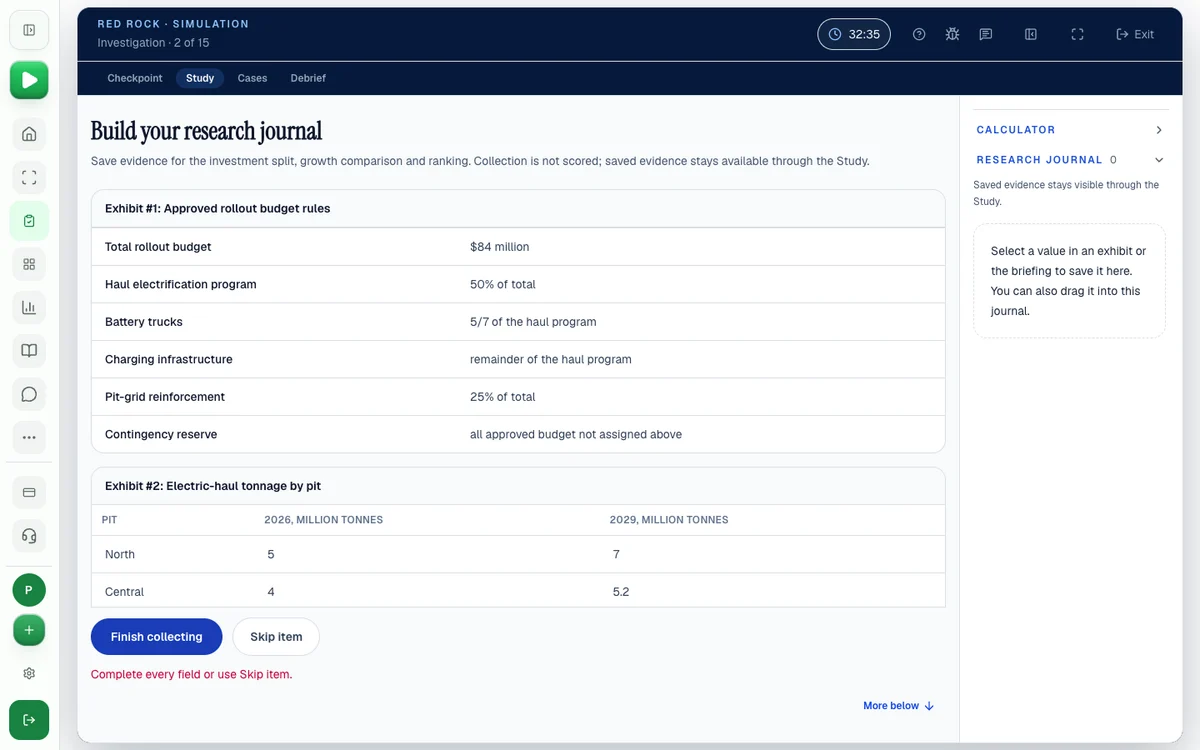
The Study section is a three-phase process where each phase builds on the previous one. Critically, you cannot go back to an earlier phase once you advance. This one-directional flow is the single biggest source of mistakes — if you miss data in Investigation, you cannot retrieve it during Analysis.
Phase 1: Investigation
During Investigation, you receive approximately one page of text accompanied by charts and tables describing the Redrock Island scenario. Your task is to collect relevant data points into a Research Journal by dragging items from the workspace.
The key discipline here: do not collect everything. You need to read the research objective first, understand what calculations you will eventually need to perform, and then collect only the data points necessary for those calculations. Candidates who grab every number indiscriminately end up with a cluttered Research Journal that slows them down in Analysis.
Phase 2: Analysis
The Analysis phase presents 2-4 math questions that use the data you collected. The on-screen calculator is available here, and it has an important feature most candidates underutilize: it logs every answer without rounding, and you can drag those logged answers into other calculations or into your Research Journal for later use.
This is where most of the module's math happens. Typical calculations include growth rates ((current - base) / base × 100%), weighted averages, simple probability, and comparisons between population figures across time periods.
A critical warning: all Study tasks are interdependent. If you get an early calculation wrong, it cascades through subsequent questions and into the Report phase. Before finalizing any answer, perform a quick sanity check — is the result directionally reasonable given the context?
Phase 3: Report
The Report phase tests whether you can take your analysis and present it clearly. You receive a partially completed research report with blank spaces. Some blanks require specific numbers from your Analysis phase. Others ask you to select words like "higher," "lower," or "equal to" when comparing scenarios.
The Report phase also includes a data visualization component: you choose the appropriate chart type (bar chart, line graph, scatter plot, pie chart, stacked bar, histogram, etc.) for a given dataset, then input your calculated numbers to build the chart.
You cannot return to Analysis from Report. If you did not save intermediate results, you will need to redo calculations under time pressure — a costly mistake.
Part 2: The Cases Section (Six Independent Cases)
After completing the Study, you move to six standalone mini-cases. Unlike the Study phases, these cases are independent of each other and independent of the Study section. An error on Case 1 does not affect Case 4. This is good news: it prevents error cascading and means you can recover from individual mistakes.
The cases test the same core skills — numerical reasoning, chart interpretation, data visualization selection — but each case is self-contained with its own data set. Community reports suggest you need to answer approximately 5 out of 6 correctly to be in passing range.
Investigation Deep Dive: How to Collect Data Strategically
Investigation is the phase candidates underestimate most. It looks easy — you read text and drag numbers into a journal. But the data you collect (or fail to collect) determines whether Analysis is smooth or painful.
Read the Research Objective First
Before you interact with any data, read the research objective completely. This statement tells you what you will ultimately need to calculate. Common objective types include:
- Comparing population changes across regions over a time period
- Identifying the region with the highest/lowest growth rate
- Computing a weighted average across multiple populations
- Determining a probability or ratio from population counts
Once you understand the objective, you know which calculations Analysis will require — and therefore which data points you need.
Map Your Data Needs Before Dragging
After reading the objective, take 30 seconds to mentally map what you will need:
- What time periods are relevant? (Beginning and end of the study window)
- What geographic regions appear in the objective?
- What population figures feed the calculations?
- Are there any denominator values you will need for percentages?
This pre-mapping step prevents the most common Investigation mistake: dragging data into the Journal that turns out to be irrelevant, while missing data that Analysis requires.
The Three Data Types You Will Encounter
Based on PSG Secrets' Redrock guide and MConsultingPrep's Redrock deep dive, Investigation materials fall into three categories:
Population tables — rows representing geographic regions or species, columns representing time periods. You typically need the first and last data points for growth rate calculations, and sometimes a midpoint for trend analysis.
Charts — bar charts showing comparative populations, line graphs showing population trends over time. The exact values matter; read axes carefully and note whether scales are linear or logarithmic.
Contextual text — narrative paragraphs with embedded clue numbers. Critically, some contextual text provides formula hints: phrases like "population density is defined as population divided by area" tell you which calculations Analysis will require. These hints are often in the opening paragraphs and easy to overlook when you are rushing to collect numbers.
The most common timing mistake is spending too long in Investigation collecting unnecessary data. Read the research objective before collecting anything. Every data point you drag into your Research Journal should connect to a calculation you will need to perform.
Complete Analysis Worked Example
The best way to understand Analysis is to walk through a realistic calculation chain. Here is a worked example based on typical Redrock scenarios.
The Scenario
Research objective: Compare the wolf population growth rate in the Northern Region versus the Southern Region from Year 1 to Year 5. Identify which region had higher growth and calculate the difference in percentage points.
Data collected during Investigation:
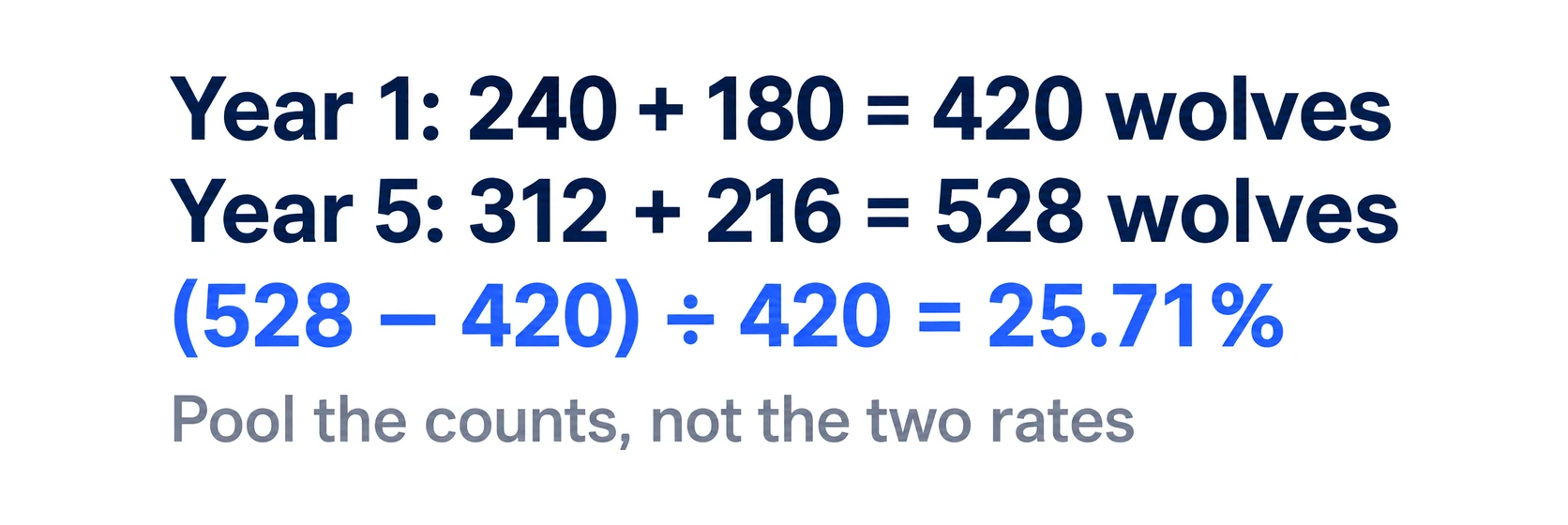
- Northern Region, Year 1: 240 wolves
- Northern Region, Year 5: 312 wolves
- Southern Region, Year 1: 180 wolves
- Southern Region, Year 5: 216 wolves
Step-by-Step Calculation
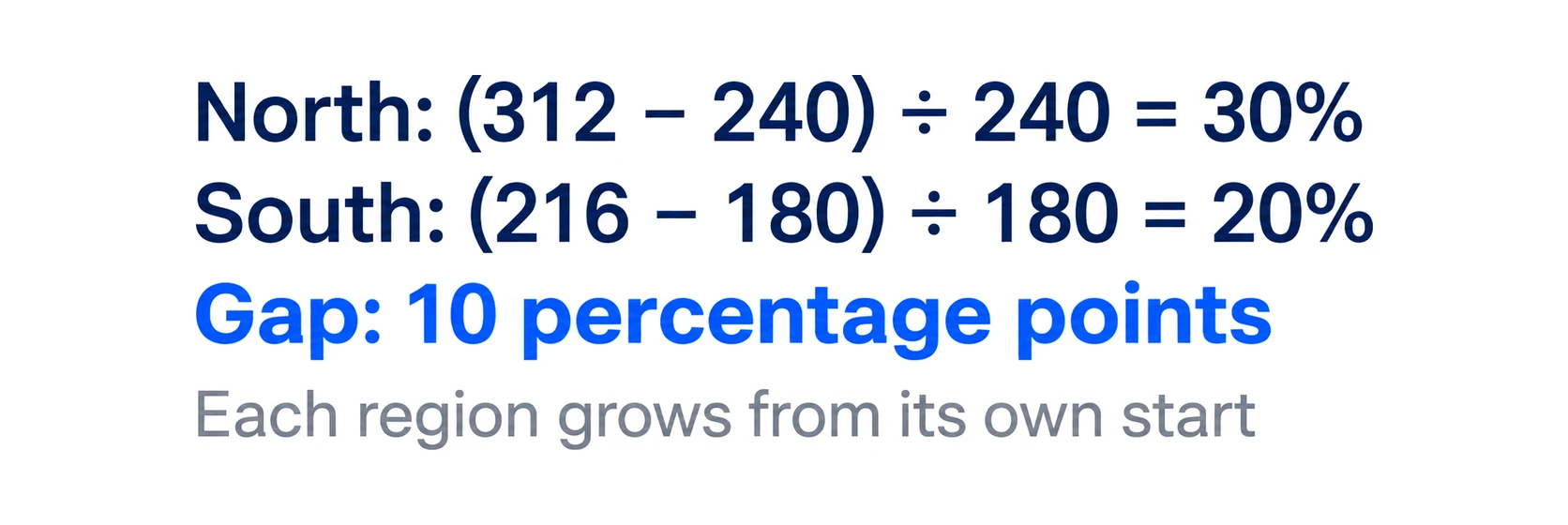
Question 1: Northern Region growth rate
Formula: (End value − Start value) / Start value × 100%
(312 − 240) / 240 × 100% = 72/240 × 100% = 0.30 × 100% = 30%
Save this result using the calculator's logging feature — do not round to "30" yet; keep the full decimal for chained calculations.
Question 2: Southern Region growth rate
(216 − 180) / 180 × 100% = 36/180 × 100% = 0.20 × 100% = 20%
Question 3: Difference in percentage points
30% − 20% = 10 percentage points
Note: this is 10 percentage points, not 10%. These are different things. The question asks for percentage points (absolute difference between two percentages), not the percentage change of the growth rates themselves. Confusing these is one of the most common errors in Redrock — see the question types section below.
Report phase answer: "The Northern Region had a higher wolf population growth rate, with a difference of 10 percentage points compared to the Southern Region."
What This Example Demonstrates
Notice that the calculation chain is three steps but each step is simple arithmetic. The challenge is not the math — it is setting up the formulas correctly (percent change, not absolute change) and preserving precision across chained calculations. Using the calculator's logging feature for both results (30% and 20%) before computing the difference prevents rounding errors.
If during Investigation you had only collected Northern Region data and forgotten to drag the Southern Region numbers, this entire question chain would be impossible to answer in Analysis. That is the cascading error problem in action.
Extended Analysis Walkthrough: Weighted Average Scenario
Many candidates feel confident on growth rate questions but struggle when Redrock introduces weighted averages. Here is a complete worked example for that scenario type.
The Scenario
Research objective: Calculate the average wolf population density across three regions of Redrock Island, weighted by each region's territory size.
Data collected during Investigation:
| Region | Wolf Population | Territory Size (km²) |
|---|---|---|
| Eastern Plains | 480 | 120 |
| Northern Forest | 360 | 180 |
| Western Coast | 240 | 60 |
Contextual text note: "Population density is defined as number of wolves per square kilometer of territory."
Step 1: Calculate Each Region's Population Density
Eastern Plains: 480 wolves ÷ 120 km² = 4.0 wolves/km² Northern Forest: 360 wolves ÷ 180 km² = 2.0 wolves/km² Western Coast: 240 wolves ÷ 60 km² = 4.0 wolves/km²
Save all three results using the calculator's logging feature.
Step 2: Calculate Island-Wide Average Density (Weighted)
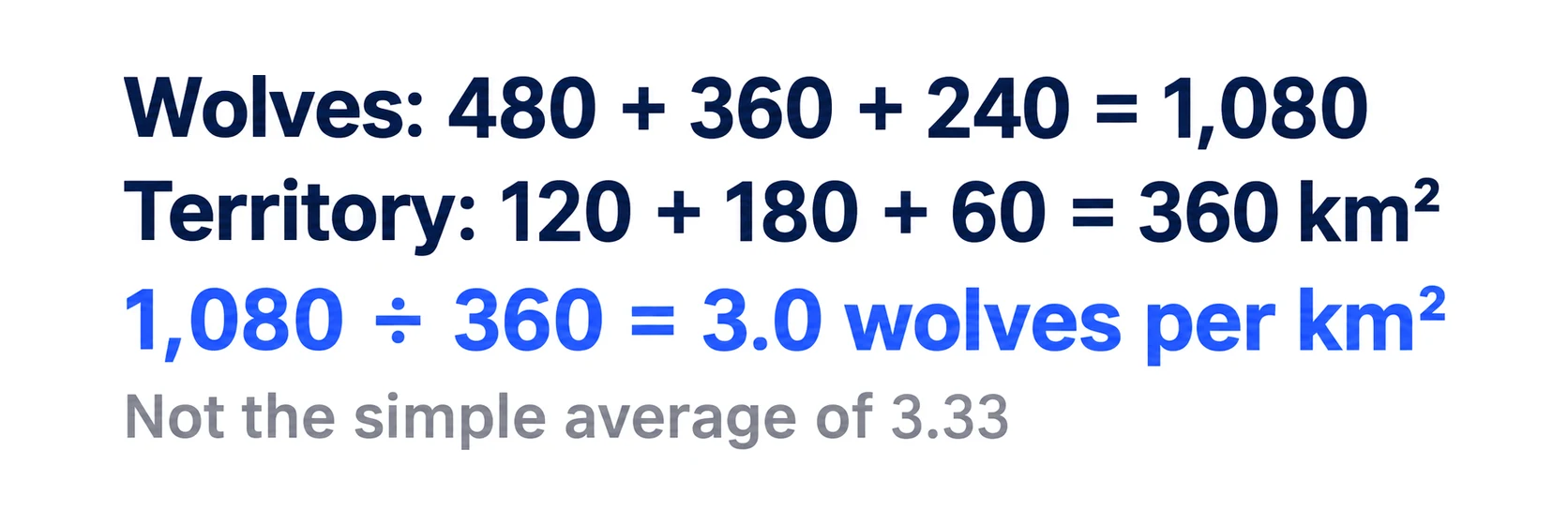
Total wolves: 480 + 360 + 240 = 1,080 Total territory: 120 + 180 + 60 = 360 km²
Island-wide density: 1,080 ÷ 360 = 3.0 wolves/km²
Step 3: Verify with Simple Average (and note the difference)
Simple (unweighted) average of the three regional densities: (4.0 + 2.0 + 4.0) / 3 = 3.33 wolves/km²
These answers differ (3.0 vs. 3.33) because the Northern Forest has the largest territory but the lowest density. The weighted average accounts for territory size; the simple average treats all three regions equally.
Redrock questions frequently ask which of these to use. If the question says "average density across the island," use the weighted method (total wolves ÷ total area). If it says "average of the three regional densities," use the simple average. Read the exact phrasing carefully.
Step 4: Report Phase Fill-In
"The island-wide wolf population density is 3.0 wolves per square kilometer, compared to a simple average of regional densities of 3.33 wolves per square kilometer. The Northern Forest region, with the largest territory, pulls the weighted average below the simple average."
Always save intermediate calculations (each regional density) before computing the weighted average. If your final answer is flagged wrong, you need to identify which step introduced the error — and that requires having each intermediate result available.
Practice case math under time pressure
Redrock's calculations mirror the quantitative reasoning in case interviews. Build speed and accuracy with our structured math drills.
The Cases Section: A Full Mini-Case Walkthrough
Each mini-case in Part 2 is self-contained and independent. Understanding the structure of a typical case lets you work through all six efficiently.
Typical Mini-Case Structure
A standard Redrock mini-case presents:
- A dataset: usually a small table (2–4 rows, 3–5 columns) or a single chart
- One to two questions about the data
The entire case fits on one screen. There is no extended text to read — the data speaks for itself. Your job is to extract the right number and answer the question correctly.
Worked Mini-Case Example 1: Growth Rate Comparison
Given data:
| Region | Year 1 Population | Year 3 Population |
|---|---|---|
| East | 420 | 504 |
| West | 360 | 396 |
| North | 290 | 319 |
Question: Which region had the highest population growth rate from Year 1 to Year 3?
Approach — calculate each region's growth rate:
- East: (504−420)/420 = 84/420 = 20%
- West: (396−360)/360 = 36/360 = 10%
- North: (319−290)/290 = 29/290 ≈ 10%
Answer: East, with a 20% growth rate.
The critical insight: the question asks for the highest growth rate, not the highest absolute increase. East's absolute increase (84) is the largest, but so is its base. The growth rate calculation is what the question requires. Reading questions carefully before computing is the most efficient habit in the Cases section.
Worked Mini-Case Example 2: Chart Interpretation
Given: A bar chart showing wolf population in five regions for Year 1 (light bars) and Year 5 (dark bars). The Y-axis runs from 0 to 600 wolves. Region D's Year 1 bar reaches approximately 400; its Year 5 bar reaches approximately 300.
Question: Which region showed the largest absolute decline in wolf population from Year 1 to Year 5?
Approach: Read each region's bars and calculate the difference.
- Region A: 200 → 240 (increase of 40)
- Region B: 350 → 420 (increase of 70)
- Region C: 500 → 480 (decline of 20)
- Region D: 400 → 300 (decline of 100)
- Region E: 150 → 180 (increase of 30)
Answer: Region D, with a decline of approximately 100 wolves.
Note: the question asks for absolute decline, not percentage decline. Region C declined by 20 wolves and Region D by 100. If the question had asked for percentage decline, Region C (20/500 = 4%) and Region D (100/400 = 25%) would have different answers. Always check whether the question asks for absolute or relative change before computing.
Worked Mini-Case Example 3: Ratio and Proportion
Given data:
| Pack | Adult Wolves | Juvenile Wolves |
|---|---|---|
| Alpha | 8 | 4 |
| Beta | 6 | 6 |
| Gamma | 10 | 2 |
| Delta | 5 | 5 |
Question: What proportion of all wolves across all four packs are juveniles? Round to the nearest whole percent.
Approach:
- Total adults: 8 + 6 + 10 + 5 = 29
- Total juveniles: 4 + 6 + 2 + 5 = 17
- Total wolves: 29 + 17 = 46
Proportion of juveniles: 17/46 = 0.3696 ≈ 37%
A common trap: candidates calculate the average of each pack's juvenile proportion instead of the total juvenile proportion. Per-pack juvenile proportions: Alpha=33%, Beta=50%, Gamma=17%, Delta=50%. Simple average: (33+50+17+50)/4 = 37.5% — coincidentally close but not the same calculation. Use the total approach unless the question specifically asks for the average of per-pack proportions.
The Read-First Rule for Cases
StrategyCase's Redrock guide recommends a consistent protocol for every case:
- Read the question before looking at the data
- Identify what you need to calculate (growth rate? absolute change? ratio? comparison?)
- Find only the relevant data points in the table or chart
- Compute and answer
This protocol prevents a common time-waster: reading all the data first, then re-reading the question, then going back to the data. The question defines your data needs; let it guide your eyes.
Scoring Rubric Breakdown
McKinsey does not publish a detailed scoring matrix, but the community consensus from PrepLounge's McKinsey Solve forum and CaseBasix's complete Solve guide reveals two dimensions of scoring.
Dimension 1: Answer Accuracy
This is the straightforward component — are your answers correct? Scoring works roughly as follows:
| Component | Weight | Target Accuracy |
|---|---|---|
| Study: Analysis answers | High | 100% (errors cascade) |
| Study: Report fill-ins | High | 90%+ |
| Study: Chart type selection | Medium | 100% (one opportunity) |
| Cases: 6 mini-cases | High | 5/6 correct (83%) |
The Analysis component has disproportionate weight because errors cascade into Report. Getting Analysis answers wrong and then reporting those wrong numbers in Report compounds your loss.
Dimension 2: Process Quality
McKinsey's assessment platform records your behavior throughout the module. According to PSG Cracked's Redrock analysis and community reports from high scorers, the platform tracks:
- Data collection efficiency — how many items you drag into Investigation, and whether they were necessary
- Calculation sequencing — whether you use the calculator's logging feature (chaining results) or re-enter numbers manually
- Decision reversals — how many times you change a drag-and-drop placement or revise an answer
- Time distribution — how you allocate time across phases
Excessive reversals and re-entries signal indecision, which negatively affects your process score. This is why preparation matters: candidates who have practiced the Investigation-Analysis-Report sequence arrive with automatic habits that produce clean process metrics.
Scoring Rubric in Practice: What Each Phase Costs
Here is a realistic scoring scenario showing how answer accuracy and process quality combine:
Candidate A (high accuracy, poor process):
- Investigation: drags 12 items, 8 relevant (4 unnecessary = moderate process penalty)
- Analysis: correct answers, but manually re-enters numbers instead of using logging
- Report: correct, but revises chart type twice
- Cases: 5/6 correct
- Estimated outcome: Borderline pass (accuracy strong, process score pulls it down)
Candidate B (95% accuracy, strong process):
- Investigation: drags 8 items, all relevant (clean process signal)
- Analysis: correct answers using logging feature throughout
- Report: correct, chart type selected confidently on first attempt
- Cases: 5/6 correct
- Estimated outcome: Clear pass (both dimensions strong)
Candidate C (cascading error, adequate process):
- Investigation: drags 8 items, all relevant
- Analysis: makes a formula error on Question 1; subsequent answers use that wrong result
- Report: fill-ins derived from wrong Analysis; some directional answers still correct
- Cases: 5/6 correct
- Estimated outcome: Likely fail (cascading error costs multiple Study points despite clean process)
What "Passing" Looks Like
Based on aggregated community data:
- Solve overall pass rate: ~20–30% of candidates (per MConsultingPrep's pass rate analysis)
- Target for Redrock accuracy: 80–85% of questions correct
- Target for Cases: 5 of 6 mini-cases correct
- Top performers often complete Redrock in 20–25 minutes, using remaining time to review
Question Types and Their Frequency
Based on candidate reports compiled from MConsultingPrep's Redrock deep dive and PrepLounge's McKinsey Solve forum, Redrock questions fall into three categories:
Math Questions (60-70% of All Questions)
These come in two subtypes:
Calculation questions give you data and ask you to compute a specific value. These may be multiple-choice or fill-in-the-blank. Examples: "What is the percentage change in the wolf population from Year 1 to Year 3?" or "Calculate the weighted average density across the four regions."
Formula questions ask you to identify the correct formula or drag the necessary numbers into a calculation template. These test whether you understand which mathematical operation applies to the scenario, not just whether you can execute arithmetic.
The math is not advanced — you will not encounter calculus or complex statistics. But it demands accuracy under time pressure. The concepts you need fluency with:
- Basic arithmetic (addition, subtraction, multiplication, division)
- Percentages and percentage points (know the difference)
- Mean, median, and mode
- Weighted averages
- Basic probability
If your mental math is rusty, our math drills cover these exact operations at the speed Redrock requires.
The Percentage vs. Percentage Points Distinction
This distinction causes more errors in Redrock than any other single concept. Here is a concrete example:
- If a population grows from 200 to 240, the percentage change is 20% (the rate of growth).
- If Region A has a 30% growth rate and Region B has a 20% growth rate, the difference is 10 percentage points (absolute difference between two rates) — not 33% (which would be the percentage change of the growth rates).
Redrock questions frequently ask for "percentage points" when comparing two rates or proportions. Reading this carefully before computing saves you from applying the wrong formula.
Additional Data Interpretation Traps
Beyond the percentage/percentage-points distinction, these are the most frequent data traps in Redrock:
Absolute vs. relative change: A population declining from 500 to 450 is a 10% relative decline (50/500) but a 50-wolf absolute decline. When the question asks "how much did the population fall?", the answer is either 10% or 50 depending on whether it asks for percentage or absolute. Both are correct answers to different questions.
Reading logarithmic scales: Some Redrock charts use logarithmic Y-axes to show data spanning a wide range. On a log scale, equal vertical distances represent equal proportional changes, not equal absolute changes. A population bar that looks "twice as tall" on a log scale does not represent twice the population — it represents 10 times the population (if the scale is base-10). Check the axis label before extracting values.
Year labeling errors: Tables sometimes label columns as "Year 0, Year 2, Year 4" rather than "Year 1, Year 5." Growth rates calculated over four intervals (Year 0 to Year 4) differ from those over two intervals (Year 2 to Year 4). Always confirm the exact time period before computing.
Footnotes and unit changes: Investigation materials occasionally include footnotes noting that a unit changed mid-period (e.g., "population figures for Years 1-3 are in hundreds; Year 4-5 are in thousands"). These footnotes are easy to miss when reading quickly and cause large calculation errors when ignored.
Reading and Interpretation Questions (20%)
These present text passages, charts, or tables and ask you to extract specific information or identify relationships. You might see 200-400 words of data alongside a chart and be asked to identify which region showed the most significant change, or what conclusion the data supports.
The trap: these questions look simple but often require careful attention to chart axes, units, and footnotes. Reading "percentage change" when the question asks for "absolute change" is a common error that costs easy points.
Visualization Questions (10-20%)
These ask you to select the most appropriate chart type for a given dataset. You might be shown population data for four species across three time periods and asked whether a bar chart, line graph, stacked area chart, or scatter plot best represents the data.
To prepare, familiarize yourself with when to use each chart type:
| Chart Type | Best For | Redrock Context |
|---|---|---|
| Bar chart | Comparing discrete categories | Population counts across regions at one time point |
| Line graph | Showing trends over time | Population change across multiple years |
| Scatter plot | Showing correlation between two variables | Population vs. territory size |
| Pie chart | Showing parts of a whole (single time period) | Species composition at one point in time |
| Stacked bar/area | Showing composition changes over time | Species distribution across years |
| Histogram | Showing distribution of a single variable | Frequency distribution of population sizes |
The Report phase's chart question gives you one attempt — there is no going back to change your selection. Knowing these rules removes ambiguity and lets you answer confidently.
Time Management: The 35-Minute Budget
You have approximately 35 minutes for the entire Redrock module — both the Study section and the Cases section. Community consensus from StrategyCase's Redrock guide and MConsultingPrep's Redrock deep dive suggests the following allocation:
| Section | Recommended Time | Notes |
|---|---|---|
| Study: Investigation | 5-7 minutes | Read objective first, then collect targeted data |
| Study: Analysis | 8-10 minutes | Use the calculator's logging feature, save intermediate results |
| Study: Report | 5-7 minutes | Fill blanks from saved results, select chart type carefully |
| Cases (6 total) | 10-12 minutes | ~1.5-2 minutes per case |
| Buffer | 3-5 minutes | For reviewing or recovering from errors |
A useful rule of thumb from CaseBasix's McKinsey Solve guide: allocate roughly two-thirds of your time to the Study section and one-third to Cases. Well-prepared candidates who have practiced with timed simulations can complete the module in 20-25 minutes, but do not rely on this — use available time to verify your answers.
Per-Phase Time Tactics
Investigation: Set a hard cap of 7 minutes. If you have not finished collecting data by minute 6, take a final 60-second review of what you have and advance. The analysis will tell you quickly if you missed something critical, but the cost of over-investing in Investigation is running out of time in Cases.
Analysis: Use the logging feature aggressively. After every calculation, save the result before moving to the next question. This takes 5 seconds and prevents the most painful scenario: reaching the Report and not having intermediate results available.
Report: The fill-in-the-blanks are fast if Analysis is done correctly. Spend most of your Report time on the chart selection and chart population — these require careful thought. Confirm your chart type against the decision table above before committing.
Cases: Apply the read-first protocol consistently. If a case is taking more than 2 minutes, make your best estimate and move on. Five careful cases beat four perfect cases and one skipped.
Time Management Under Pressure: Decision Rules
If you find yourself running behind schedule, apply these priority rules:
If you are over time in Investigation: Stop collecting. Advance to Analysis with what you have. If a question requires data you missed, use context clues to estimate — a partially-correct answer scores better than a blank.
If you are over time in Analysis: Save what you have, advance to Report. Use your saved results for fill-ins. Estimate any blanks that require calculations you didn't complete — directional answers ("higher" vs. "lower") are often correct even with imprecise numbers.
If you are over time in Report: Submit and move to Cases. Each Case is independent and worth points regardless of your Study performance. A mediocre Study with a strong Cases section can still pass.
If you are over time in Cases: Never skip — guess. Each case has a 25–50% chance of a correct guess even with no time. An educated estimate based on a quick scan of the data is better than a blank answer.
Common Pitfalls and How to Avoid Them
Based on community analysis from PrepLounge forums, MConsultingPrep, and StrategyCase, here are the most frequent errors that cost candidates points:
Pitfall 1: Treating Investigation as Easy and Rushing Through It
Investigation looks simple — you read text and drag numbers. Candidates who assume it requires minimal attention often advance without collecting a key data point, then discover the gap mid-Analysis when they cannot complete a calculation.
Fix: Read the research objective twice. Map out every calculation Analysis will require. Only then start collecting. Do not advance until you have verified you have everything.
Pitfall 2: Not Using the Calculator's Logging Feature
The on-screen calculator logs results for reuse without rounding. Candidates who ignore this feature enter intermediate results manually into subsequent calculations, introducing rounding errors that compound across chained questions.
Fix: After every calculation, save the result using the logging feature before moving to the next question. This is a 5-second habit that prevents cascading rounding errors.
Pitfall 3: Confusing Percentage Change with Percentage Points
This mistake is responsible for more Redrock errors than any other single conceptual confusion. A growth rate of 30% vs. 20% differs by 10 percentage points — not by 33% (the percentage change of the rates).
Fix: Before starting Solve, practice 10–15 problems that specifically mix "percentage change" and "percentage point difference" scenarios. The distinction must be automatic — under time pressure, you will not have time to reason through it from scratch.
Pitfall 4: Selecting the Wrong Chart Type on the First Attempt
Chart type selection in Report gets one shot. Candidates who have not practiced the bar-vs-line-vs-scatter decision make errors that are impossible to correct.
Fix: Memorize the chart type decision rules in the visualization section above. Before the assessment, practice with at least 20 chart-type matching exercises until the selection is automatic.
Pitfall 5: Spending More Than 2 Minutes Per Case
The Cases section gives you roughly 10–12 minutes for 6 cases — about 1.5–2 minutes each. Candidates who spend 3–4 minutes on a difficult early case run out of time for later cases they would have gotten right with 90 seconds of attention.
Fix: Set a hard 2-minute limit per case. If you are stuck, make your best estimate and move on. You can note it for review if time remains at the end, but do not let one difficult case cannibalize your score on easier ones.
Pitfall 6: Ignoring the Process Score
Some candidates optimize entirely for answer accuracy and ignore how they reach their answers. But McKinsey's platform records every action — excessive data collection in Investigation, manual re-entry of previously calculated numbers, and multiple revisions all signal poor process quality.
Fix: Practice the full Investigation-Analysis-Report sequence repeatedly until your habits are systematic: objective first, targeted data collection, logging feature for every calculation, no unnecessary revisions.
The On-Screen Tools: Research Journal and Calculator
Redrock provides two built-in tools that most candidates underutilize.
The Research Journal is where you store collected data during Investigation. Think of it as a structured notepad. The data you place here carries forward into Analysis and Report. Organize it logically — group related data points together so you can find them quickly when computing.
The On-Screen Calculator does more than basic arithmetic. It logs every calculation result without rounding, and those logged results can be dragged directly into answer boxes, the Research Journal, or subsequent calculations. This feature is powerful because it eliminates rounding errors that compound across interdependent questions. If a growth rate calculation feeds into a weighted average, using the unrounded logged result produces a more accurate final answer than rounding and re-entering.
Practical tip from candidates who have passed: if you have access to a physical keyboard with a numpad, use it. The numpad significantly speeds up calculator input compared to clicking on-screen buttons, potentially saving several minutes across the full module.
What Most Guides Get Wrong About Redrock
After reviewing the top-ranking competitor guides, here are the gaps most of them share:
They describe Redrock as a reading comprehension test. It is not. Reading comprehension accounts for roughly 20% of questions. The module is primarily a math and data interpretation exercise. Candidates who prepare by practicing speed-reading rather than timed calculations are optimizing for the wrong skill.
They overlook the cascading error problem. Because the three Study phases are sequential and interdependent, a single calculation error in Analysis can invalidate your Report and cost you multiple questions. No other section of Solve has this compounding risk. The mitigation is simple: use the calculator's logging feature, save intermediate results, and perform sanity checks before advancing.
They understate the visualization component. Selecting the wrong chart type is a guaranteed lost point, and the correct choice is not always obvious. If you haven't practiced distinguishing when to use a stacked bar chart versus a grouped bar chart, or a line graph versus a scatter plot, add that to your preparation.
They don't mention the 80-85% accuracy threshold. Based on community data compiled across PrepLounge and Wall Street Oasis forums, candidates who answer roughly 80-85% of Redrock questions correctly tend to pass this component. For Part 2 specifically, that means getting at least 5 of 6 cases right. This threshold matters for decision-making — if you are running low on time, it is better to answer five cases carefully than to rush through all six.
They ignore the process score. The 2026 Redrock assessment tracks more than final answers. Systematic data collection in Investigation, clean use of the calculator's logging function, and low decision-reversal rates all contribute to a process quality score. Candidates who practice the full sequence repeatedly build habits that produce clean process metrics automatically.
Test Your Redrock Knowledge
Test yourself
Question 1 of 5
QuizDuring Investigation, you see a chart showing wolf population data for Years 1, 3, and 5. Your research objective asks you to compare growth from Year 1 to Year 5. Which data points should you drag into your Journal?
How Redrock Connects to Case Interviews
Redrock Study is not arbitrary. The skills it tests translate directly to what McKinsey evaluates in live case interviews:
- Data interpretation under pressure — In a case interview, you receive exhibits containing charts and tables. Misreading an axis or confusing percentage change with absolute change is the same mistake that costs points in Redrock.
- Structured analysis — The Investigation-Analysis-Report flow mirrors how consultants actually work: collect data, analyze it, present findings. If you cannot execute this sequence efficiently under time pressure in Redrock, you will struggle in case interviews too.
- Precise communication of findings — The Report phase tests whether you can fill in a narrative with accurate numbers and appropriate language. In a live case, this maps to the synthesis — presenting your conclusion with supporting evidence.
- Avoiding common data traps — The percentage vs. percentage points distinction that trips up candidates in Redrock is the same distinction that separates strong from weak performers on exhibit interpretation in live McKinsey cases.
If you pass Solve and advance to live interviews, the McKinsey Case Interview Guide covers the candidate-led format in depth. The McKinsey Solve Guide provides an overview of both Solve modules together with preparation timelines. If you need to prepare for the behavioral component, the McKinsey PEI Guide covers Personal Experience Interview questions specifically. The case interview data interpretation guide directly reinforces the exhibit-reading skills Redrock tests. For candidates who want to sharpen the underlying quantitative mechanics, the case interview math practice guide covers percentages, weighted averages, and growth rate calculations at the speed Redrock demands. The case interview scoring rubric guide explains what McKinsey evaluates in live cases — useful for understanding why process quality matters in Solve as well.
Practice Strategy: What Actually Works
Redrock rewards structured preparation more than any other Solve module. Here is a preparation approach based on what successful candidates report:
Step 1: Build math fluency (Days 1-3). Practice percentages, weighted averages, and growth rate calculations until they are automatic. The computations in Redrock are not complex, but they must be fast and accurate. Pay particular attention to the percentage vs. percentage points distinction — create a dozen practice problems that specifically test this. Our math drills are designed for exactly this speed-accuracy tradeoff.
Step 2: Learn the chart types (Days 2-4). Take each chart type from the visualization table above and find real examples online. For each example, ask: why is this chart type used here? What would be lost if a different chart type were used? Spend particular time on line graphs vs. scatter plots (both show two variables but serve different purposes) and bar charts vs. stacked bars (both compare categories but one adds a composition dimension).
Step 3: Practice chart interpretation (Days 3-5). Find bar charts, line graphs, and scatter plots online. Give yourself 60 seconds per chart to extract the key story: What is the main trend? What is the outlier? What does the data not show? This builds the rapid assessment skill Redrock requires.
Step 4: Run timed simulations (Days 5-10). The single most effective preparation method is completing timed mock Redrock simulations. Multiple platforms offer these, including CaseBasix (free simulations), Prepmatter (9 full-length scenarios), and StrategyCase. Community consensus from PrepLounge forums suggests 15-25 practice tests as the minimum for reliable preparation.
Step 5: Review errors systematically (ongoing). After each practice run, identify whether your mistakes were math errors, misreads of the question, visualization selection errors, or time management failures. Each category requires different remediation:
- Math errors → more drill practice on the specific operation
- Question misreads → practice reading the full question before computing
- Visualization errors → revisit the chart type decision table until selection is automatic
- Time management failures → adjust your phase budget and set interim checkpoints
If you want to practice the data reasoning skills that Redrock tests alongside your case interview preparation, try a practice case on our dashboard — the exhibit-interpretation component exercises the same analytical muscles.
Key Takeaways
- Redrock Study is a math-heavy research simulation with two parts: a three-phase Study (Investigation, Analysis, Report) and six independent Cases.
- Approximately 60-70% of questions involve calculations. Build fluency with percentages vs. percentage points, weighted averages, and growth rates before taking Solve.
- The three Study phases are sequential and one-directional — errors in Investigation cascade through Analysis and Report. Collect data strategically and save intermediate results.
- Use the on-screen calculator's logging feature to chain unrounded results and prevent compounding errors.
- Aim for 80-85% accuracy overall. In the Cases section, target at least 5 of 6 correct answers.
- Time allocation: roughly two-thirds of your 35 minutes on the Study section, one-third on Cases, with a small buffer for review.
- The 2026 version tracks process quality — clean, systematic behavior (minimal reversals, strategic data collection) improves your score beyond answer accuracy alone.
- Apply the read-first protocol in Cases: read the question before the data, identify what you need to calculate, then find only the relevant numbers.
- The six most common pitfalls are: rushing Investigation, not using the logging feature, confusing percentage vs. percentage points, wrong chart type selection, spending too long per case, and ignoring process quality.
- The skills Redrock tests — data interpretation, structured analysis, and clear presentation — are the same skills McKinsey evaluates in live case interviews.
Check your Redrock readiness
Redrock tests data interpretation, structured analysis, and clear presentation. See how you score on these dimensions before taking Solve.
Frequently asked questions
Continue your prep path
Next actions based on this article: one pillar hub, two related guides, and one conversion step.
Pillar hub
MBB and Firm-Specific Hub
Related guide
McKinsey Sea Wolf Game: How to Score High in 2026
Related guide
McKinsey Solve Guide 2026: Sea Wolf Game and Redrock Study
Related articles
McKinsey Sea Wolf Game: How to Score High in 2026
Complete Sea Wolf strategy guide for McKinsey Solve 2026. Covers microbe selection mechanics, attribute averaging, trait filtering, efficiency scoring, worked example walkthrough, common mistakes, and practice strategy.
McKinsey Solve Guide 2026: Sea Wolf Game and Redrock Study
The 2026 McKinsey Solve guide for McKinsey Sea Wolf game and McKinsey Redrock: module breakdowns, dual scoring system, 10-day prep plan, and checklist.
McKinsey Solve Ecosystem Building: Species Selection, Scoring, and Full Strategy (2026)
Ecosystem Building is the hardest McKinsey Solve game. Here's the complete species selection strategy, food chain logic, and how McKinsey actually scores it.